Filter logcat by tag, package, PID and regex
Combine level, tag, package, message, PID, and TID rules with substring or regular-expression matching.
Features / Android logcat analyzer
Indagium is a free, offline Android log analyzer: narrow the signal, follow the sequence, test a theory, and preserve the evidence that supports it — no Android Studio required.
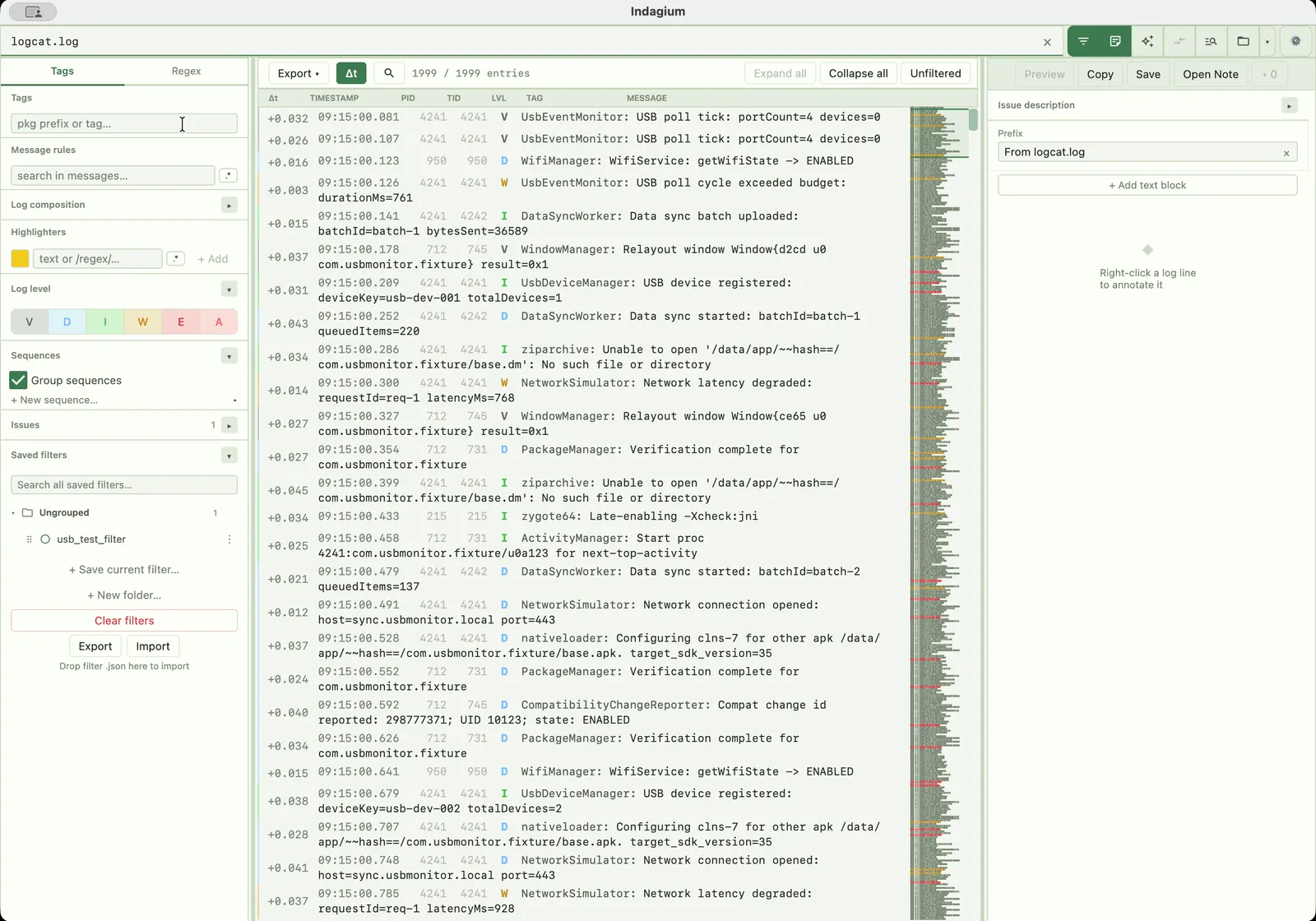
A practical analysis surface
Analysis is easier to revisit when the operations that found the clue stay visible. This log analyzer keeps the raw file and the investigative trail together.
Combine level, tag, package, message, PID, and TID rules with substring or regular-expression matching.
Fold recurring regions into sequences, color matched spans or whole lines, import klogg highlighter sets, and search either the filtered view or all log lines.
Open two tabs side by side, each with its own filter, or mirror the filter when comparing traces.
Annotate selections and export filtered logs to TXT or CSV, with notes that explain why the evidence matters.
Stream Android logcat and record the screen together over USB or Android 11+ wireless debugging, then reopen a ZIP or Indagium Compact (.ind) archive in Indagium with synchronized logs and available video.
Create an editable diagram from selected rows or a filtered view, keep each message connected to its log evidence, and review unsupported targets before assigning them. Explore sequence diagrams →
What you can analyze
The same filters, sequences, and exports work whether the source is a raw logcat file, a bugreport archive, or a DLT trace — nothing needs converting first.
Analyze logcat .txt or .log files in threadtime, time, brief, or bare format; unrecognised lines are tagged RAW so nothing is silently dropped.
Open a bugreport .zip or .7z archive directly and analyze the log content inside it without unpacking the archive first.
Analyze .dlt binary captures and raw DLT streams with the same filter rules; oversized captures can be split frame-aware.
Open DLT Viewer text and CSV exports and analyze them alongside logcat, including CSV parts that repeat the header row.
Why analyze offline
Indagium is a desktop app: logs, bugreports, and DLT captures are read and analyzed locally, so a large or sensitive trace never has to leave your disk to be filtered, folded, and searched.
Connected tools
Questions
Common questions about filtering, analyzing, and exporting Android logcat, bugreports, and DLT captures in Indagium.
A viewer opens a file; the analyzer stays attached to it — combining filters, folded sequences, comparisons, and notes so you can test a theory without leaving the trace.
Yes. Level, tag, package, message, PID, and TID rules all accept substring or regular-expression matching.
Yes — open the bugreport's .zip or .7z archive directly, choose what to load, then run the same filters, sequences, and exports against it.
Yes. Indagium is a desktop app — your logs and bugreports stay on your machine; nothing is uploaded unless you turn on the optional AI assistant.
Optionally. Indagium can connect a local or hosted AI provider, or any MCP client, to the active tab's filters, sequences, and source lookup, with every file-changing action staying under your control.